IBM watsonx Orchestrate’s Embedded Chat feature allows you to integrate the watsonx Orchestrate chat experience into your own web UI applications. To ensure secure communication between your application and the watsonx Orchestrate service, the Embedded Chat feature includes security mechanisms that use public-key cryptography.
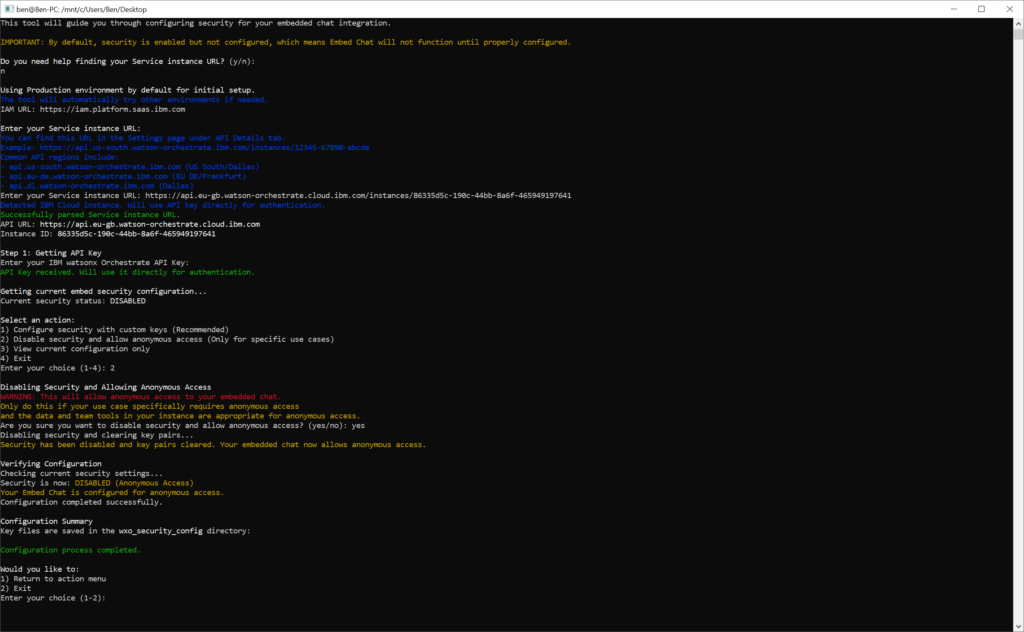
In some cases I might be required that you want to have the webchat without security. To disable the security you need to run the following script.
#!/bin/bash
# IBM watsonx Orchestrate - Embedded Chat Security Configuration Tool (Universal Version)
# This script works on both Windows (PowerShell) and Unix-based systems (Bash)
# Detect OS and execute appropriate script
if [ -n "$BASH_VERSION" ]; then
# Running in Bash (Unix/Linux/Mac)
echo "Detected Bash environment. Running Unix/Linux/Mac version..."
# Parse command line arguments
VERBOSE=false
for arg in "$@"; do
case $arg in
-v|--verbose)
VERBOSE=true
shift
;;
esac
done
# Text formatting for Bash
BOLD='\033[1m'
GREEN='\033[0;32m'
YELLOW='\033[0;33m'
RED='\033[0;31m'
BLUE='\033[0;34m'
NC='\033[0m' # No Color
# Debug function that only prints in verbose mode
debug_print() {
if [ "$VERBOSE" = true ]; then
echo -e "${BLUE}DEBUG: $1${NC}"
fi
}
# Create output directory
OUTPUT_DIR="wxo_security_config"
echo -e "${BLUE}Creating output directory: $OUTPUT_DIR${NC}"
# Check if directory exists
if [ -d "$OUTPUT_DIR" ]; then
echo -e "${GREEN}Output directory already exists.${NC}"
else
# Try to create the directory
mkdir -p "$OUTPUT_DIR" 2>/dev/null
# Check if creation was successful
if [ -d "$OUTPUT_DIR" ]; then
echo -e "${GREEN}Output directory created successfully.${NC}"
else
echo -e "${RED}ERROR: Failed to create output directory '$OUTPUT_DIR'.${NC}"
echo -e "${YELLOW}Please check permissions or create the directory manually:${NC}"
echo -e " mkdir -p $OUTPUT_DIR"
echo -e "${YELLOW}Then run this script again.${NC}"
exit 1
fi
fi
# Verify directory is writable
if [ -w "$OUTPUT_DIR" ]; then
echo -e "${GREEN}Output directory is writable.${NC}"
else
echo -e "${RED}ERROR: Output directory '$OUTPUT_DIR' is not writable.${NC}"
echo -e "${YELLOW}Please check permissions:${NC}"
echo -e " chmod 755 $OUTPUT_DIR"
echo -e "${YELLOW}Then run this script again.${NC}"
exit 1
fi
# Display welcome message
echo -e "${BOLD}Welcome to the IBM watsonx Orchestrate Embedded Chat Security Configuration Tool${NC}\n"
echo -e "This tool will guide you through configuring security for your embedded chat integration.\n"
echo -e "${YELLOW}IMPORTANT: By default, security is enabled but not configured, which means Embed Chat will not function until properly configured.${NC}\n"
# Function to check and create output directory
check_output_directory() {
# Check if directory exists
if [ ! -d "$OUTPUT_DIR" ]; then
echo -e "${YELLOW}Output directory '$OUTPUT_DIR' does not exist. Creating it now...${NC}"
# Try to create the directory
mkdir -p "$OUTPUT_DIR" 2>/dev/null
# Check if creation was successful
if [ ! -d "$OUTPUT_DIR" ]; then
echo -e "${RED}ERROR: Failed to create output directory '$OUTPUT_DIR'.${NC}"
echo -e "${YELLOW}Please check permissions or create the directory manually:${NC}"
echo -e " mkdir -p $OUTPUT_DIR"
return 1
fi
fi
# Verify directory is writable
if [ ! -w "$OUTPUT_DIR" ]; then
echo -e "${RED}ERROR: Output directory '$OUTPUT_DIR' is not writable.${NC}"
echo -e "${YELLOW}Please check permissions:${NC}"
echo -e " chmod 755 $OUTPUT_DIR"
return 1
fi
return 0
}
# Function to get user input with validation
get_input() {
local prompt="$1"
local var_name="$2"
local is_secret="$3"
local value=""
while [ -z "$value" ]; do
if [ "$is_secret" = true ]; then
read -sp "$prompt: " value
echo
else
read -p "$prompt: " value
fi
if [ -z "$value" ]; then
echo -e "${YELLOW}This field cannot be empty. Please try again.${NC}"
fi
done
eval $var_name=\$value
}
# Function to display help for finding instance ID and API URL
show_instance_id_help() {
echo -e "\n${BOLD}How to Find Your Instance ID and API URL:${NC}"
echo -e "1. Log in to your watsonx Orchestrate instance"
echo -e "2. Click on the profile icon in the top right corner"
echo -e "3. Select \"Settings\" from the dropdown menu"
echo -e "4. Navigate to the \"API Details\" tab"
echo -e "5. Find the \"Service instance URL\" field, which looks like:"
echo -e " ${BLUE}https://api.us-south.watson-orchestrate.ibm.com/instances/20250807-1007-4445-5049-459a42144389${NC}"
echo -e "6. Your API URL is the base URL: ${BLUE}https://api.us-south.watson-orchestrate.ibm.com${NC}"
echo -e "7. Your Instance ID is the UUID after \"/instances/\": ${BLUE}20250807-1007-4445-5049-459a42144389${NC}"
echo -e "\nYour API Key can also be found in the same API Details tab."
echo -e "Press Enter to continue..."
read
}
# Function to select environment
select_environment() {
# Default to Production environment
ENVIRONMENT="PROD"
IAMURL="https://iam.platform.saas.ibm.com"
echo -e "\n${BOLD}Using Production environment by default for initial setup.${NC}"
echo -e "${BLUE}The tool will automatically try other environments if needed.${NC}"
echo "IAM URL: $IAMURL"
}
# Function to select a different environment if needed
select_different_environment() {
echo -e "\n${BOLD}Select your environment:${NC}"
echo "1) Development"
echo "2) Test"
echo "3) Production"
local selection
while true; do
read -p "Enter your choice (1-3): " selection
case $selection in
1) ENVIRONMENT="DEV"; IAMURL="https://iam.platform.dev.saas.ibm.com"; break;;
2) ENVIRONMENT="TEST"; IAMURL="https://iam.platform.test.saas.ibm.com"; break;;
3) ENVIRONMENT="PROD"; IAMURL="https://iam.platform.saas.ibm.com"; break;;
*) echo -e "${YELLOW}Invalid selection. Please enter 1, 2, or 3.${NC}";;
esac
done
echo -e "${GREEN}Selected environment: $ENVIRONMENT${NC}"
echo "IAM URL: $IAMURL"
}
# Function to parse Service instance URL and extract API URL and instance ID
parse_service_instance_url() {
local service_url="$1"
# Check if the URL matches the expected pattern
if [[ $service_url =~ ^(https?://[^/]+)/instances/([a-zA-Z0-9-]+)$ ]]; then
API_URL="${BASH_REMATCH[1]}"
WXO_INSTANCE_ID="${BASH_REMATCH[2]}"
# Check if this is an IBM Cloud instance
if [[ $API_URL == *".cloud.ibm.com"* ]]; then
IS_IBM_CLOUD=true
echo -e "${BLUE}Detected IBM Cloud instance. Will use API key directly for authentication.${NC}"
else
IS_IBM_CLOUD=false
fi
return 0
else
return 1
fi
}
# Function to get API URL and instance ID
get_service_details() {
echo -e "\n${BOLD}Enter your Service instance URL:${NC}"
echo -e "${BLUE}You can find this URL in the Settings page under API Details tab.${NC}"
echo -e "${BLUE}Example: https://api.us-south.watson-orchestrate.ibm.com/instances/12345-67890-abcde${NC}"
echo -e "${BLUE}Common API regions include:${NC}"
echo -e "${BLUE}- api.us-south.watson-orchestrate.ibm.com (US South/Dallas)${NC}"
echo -e "${BLUE}- api.eu-de.watson-orchestrate.ibm.com (EU DE/Frankfurt)${NC}"
echo -e "${BLUE}- api.dl.watson-orchestrate.ibm.com (Dallas)${NC}"
local service_url
while true; do
read -p "Enter your Service instance URL: " service_url
if [[ -z "$service_url" ]]; then
echo -e "${YELLOW}This field cannot be empty. Please try again.${NC}"
continue
fi
if parse_service_instance_url "$service_url"; then
echo -e "${GREEN}Successfully parsed Service instance URL.${NC}"
echo -e "API URL: ${BOLD}$API_URL${NC}"
echo -e "Instance ID: ${BOLD}$WXO_INSTANCE_ID${NC}"
return 0
else
echo -e "${YELLOW}Invalid Service instance URL format. It should be like:${NC}"
echo -e "${YELLOW}https://api.us-south.watson-orchestrate.ibm.com/instances/12345-67890-abcde${NC}"
read -p "Would you like to enter the API URL and Instance ID separately? (yes/no): " separate_input
if [[ "$separate_input" == "yes" ]]; then
get_api_url_separately
get_instance_id_separately
return 0
fi
fi
done
}
# Function to get API URL separately
get_api_url_separately() {
echo -e "\n${BOLD}Enter your API URL:${NC}"
echo -e "${BLUE}It's the base part of your Service instance URL (before /instances/).${NC}"
echo -e "${BLUE}Example: https://api.us-south.watson-orchestrate.ibm.com${NC}"
get_input "Enter your API URL" API_URL false
echo -e "${GREEN}API URL: $API_URL${NC}"
}
# Function to get instance ID separately
get_instance_id_separately() {
echo -e "\n${BOLD}Enter your Orchestrate instance ID:${NC}"
echo -e "${BLUE}This is the UUID after /instances/ in your Service instance URL.${NC}"
echo -e "${BLUE}Example: 12345-67890-abcde${NC}"
get_input "Enter your Orchestrate instance ID" WXO_INSTANCE_ID false
}
# Function to obtain IAM token
obtain_iam_token() {
# Check output directory before saving token
check_output_directory || exit 1
echo -e "\n${BOLD}Step 1: Obtaining IAM Token${NC}"
get_input "Enter your IBM watsonx Orchestrate API Key" WXO_API_KEY true
# Keep track of which environments have been tried
local tried_prod=false
local tried_dev=false
local tried_test=false
local token_obtained=false
# Try with the default environment first
echo -e "\nTrying with ${BOLD}$ENVIRONMENT${NC} environment..."
echo "IAM URL: $IAMURL"
TOKEN_RESPONSE=$(curl --fail -sS \
--request POST \
--url "$IAMURL/siusermgr/api/1.0/apikeys/token" \
--header "accept: application/json" \
--header "content-type: application/json" \
--data "{\"apikey\": \"$WXO_API_KEY\"}" 2>&1)
if [ $? -eq 0 ]; then
WXO_TOKEN=$(echo $TOKEN_RESPONSE | grep -o '"token":"[^"]*' | cut -d'"' -f4)
if [ -n "$WXO_TOKEN" ]; then
token_obtained=true
echo -e "${GREEN}Successfully obtained IAM token with $ENVIRONMENT environment.${NC}"
# Store token in memory only, don't save to file
echo -e "${GREEN}Successfully obtained IAM token.${NC}"
fi
fi
# Mark the current environment as tried
if [ "$ENVIRONMENT" = "PROD" ]; then
tried_prod=true
elif [ "$ENVIRONMENT" = "DEV" ]; then
tried_dev=true
elif [ "$ENVIRONMENT" = "TEST" ]; then
tried_test=true
fi
# If token was not obtained, try other environments
while [ "$token_obtained" = false ]; do
echo -e "${YELLOW}Failed to obtain token with $ENVIRONMENT environment.${NC}"
echo "$TOKEN_RESPONSE"
echo -e "\n${YELLOW}This could be due to:${NC}"
echo -e "1. Incorrect API key"
echo -e "2. Using an API key from a different watsonx Orchestrate environment"
# Check if all environments have been tried
if [ "$tried_prod" = true ] && [ "$tried_dev" = true ] && [ "$tried_test" = true ]; then
echo -e "\n${RED}Failed to obtain IAM token after trying all environments (PROD, DEV, TEST).${NC}"
echo -e "${RED}This likely indicates an incorrect API key. Please verify your API key and try again.${NC}"
exit 1
fi
echo -e "\n${BOLD}Would you like to try a different environment?${NC}"
echo "1) Development $([ "$tried_dev" = true ] && echo "[Already tried]")"
echo "2) Test $([ "$tried_test" = true ] && echo "[Already tried]")"
echo "3) Production $([ "$tried_prod" = true ] && echo "[Already tried]")"
echo "4) Exit"
local selection
read -p "Enter your choice (1-4): " selection
case $selection in
1)
if [ "$tried_dev" = true ]; then
echo -e "${YELLOW}You've already tried the Development environment.${NC}"
continue
fi
ENVIRONMENT="DEV"
IAMURL="https://iam.platform.dev.saas.ibm.com"
tried_dev=true
;;
2)
if [ "$tried_test" = true ]; then
echo -e "${YELLOW}You've already tried the Test environment.${NC}"
continue
fi
ENVIRONMENT="TEST"
IAMURL="https://iam.platform.test.saas.ibm.com"
tried_test=true
;;
3)
if [ "$tried_prod" = true ]; then
echo -e "${YELLOW}You've already tried the Production environment.${NC}"
continue
fi
ENVIRONMENT="PROD"
IAMURL="https://iam.platform.saas.ibm.com"
tried_prod=true
;;
4)
echo -e "${BLUE}Exiting the configuration tool.${NC}"
exit 0
;;
*)
echo -e "${YELLOW}Invalid selection. Please enter 1, 2, 3, or 4.${NC}"
continue
;;
esac
echo -e "\nTrying with ${BOLD}$ENVIRONMENT${NC} environment..."
echo "IAM URL: $IAMURL"
TOKEN_RESPONSE=$(curl --fail -sS \
--request POST \
--url "$IAMURL/siusermgr/api/1.0/apikeys/token" \
--header "accept: application/json" \
--header "content-type: application/json" \
--data "{\"apikey\": \"$WXO_API_KEY\"}" 2>&1)
if [ $? -eq 0 ]; then
WXO_TOKEN=$(echo $TOKEN_RESPONSE | grep -o '"token":"[^"]*' | cut -d'"' -f4)
if [ -n "$WXO_TOKEN" ]; then
token_obtained=true
echo -e "${GREEN}Successfully obtained IAM token with $ENVIRONMENT environment.${NC}"
# Store token in memory only, don't save to file
echo -e "${GREEN}Successfully obtained IAM token.${NC}"
fi
fi
done
}
# Function to get current configuration
get_current_config() {
# Check output directory before saving configuration
check_output_directory || exit 1
echo -e "\n${BOLD}Getting current embed security configuration...${NC}"
# Use different authentication header based on instance type
if [ "$IS_IBM_CLOUD" = true ]; then
CONFIG_RESPONSE=$(curl --fail -sS \
--request GET \
--url "$API_URL/instances/$WXO_INSTANCE_ID/v1/embed/secure/config" \
--header "IAM-API_KEY: $WXO_API_KEY" \
--header "accept: application/json" 2>&1)
else
CONFIG_RESPONSE=$(curl --fail -sS \
--request GET \
--url "$API_URL/instances/$WXO_INSTANCE_ID/v1/embed/secure/config" \
--header "Authorization: Bearer $WXO_TOKEN" \
--header "accept: application/json" 2>&1)
fi
if [ $? -ne 0 ]; then
echo -e "${YELLOW}Could not retrieve current configuration:${NC}"
# Display error message
echo -e "${YELLOW}Could not retrieve current configuration: $CONFIG_RESPONSE${NC}"
echo -e "${YELLOW}This may be normal if security has not been configured yet.${NC}"
echo -e "${YELLOW}In this state, security is enabled by default but Embed Chat will not function until properly configured.${NC}"
IS_SECURITY_ENABLED="unknown"
else
# Don't save configuration to file
IS_SECURITY_ENABLED=$(echo $CONFIG_RESPONSE | grep -o '"is_security_enabled":[^,}]*' | cut -d':' -f2 | tr -d ' ')
echo -e "Current security status: ${BOLD}$([ "$IS_SECURITY_ENABLED" = "true" ] && echo "ENABLED" || echo "DISABLED")${NC}"
if [ "$IS_SECURITY_ENABLED" = "true" ]; then
HAS_PUBLIC_KEY=$(echo $CONFIG_RESPONSE | grep -o '"public_key"' | wc -l)
HAS_CLIENT_PUBLIC_KEY=$(echo $CONFIG_RESPONSE | grep -o '"client_public_key"' | wc -l)
if [ "$HAS_PUBLIC_KEY" -eq 0 ] || [ "$HAS_CLIENT_PUBLIC_KEY" -eq 0 ]; then
echo -e "${YELLOW}WARNING: Security is enabled but configuration is incomplete. Embed Chat will not function properly.${NC}"
else
echo -e "${GREEN}Security is properly configured with both IBM and client public keys.${NC}"
fi
fi
fi
}
# Function to generate IBM public key
generate_ibm_key() {
# Check output directory before saving keys
check_output_directory || exit 1
echo -e "\n${BOLD}Step 2: Generating IBM Public Key${NC}"
echo "Requesting new IBM key pair..."
# Use different authentication header based on instance type
if [ "$IS_IBM_CLOUD" = true ]; then
IBM_KEY_RESPONSE=$(curl --fail -sS \
--request POST \
--url "$API_URL/instances/$WXO_INSTANCE_ID/v1/embed/secure/generate-key-pair" \
--header "IAM-API_KEY: $WXO_API_KEY" \
--header "accept: application/json" 2>&1)
else
IBM_KEY_RESPONSE=$(curl --fail -sS \
--request POST \
--url "$API_URL/instances/$WXO_INSTANCE_ID/v1/embed/secure/generate-key-pair" \
--header "Authorization: Bearer $WXO_TOKEN" \
--header "accept: application/json" 2>&1)
fi
if [ $? -ne 0 ]; then
echo -e "${RED}Failed to generate IBM key pair:${NC}"
echo "$IBM_KEY_RESPONSE"
exit 1
fi
# Extract the public key from the response
echo -e "${BLUE}Extracting and saving IBM public key...${NC}"
# Extract the key directly using Python one-liner
IBM_PUBLIC_KEY=$(echo "$IBM_KEY_RESPONSE" | python3 -c '
import re, sys
content = sys.stdin.read()
match = re.search(r"\"public_key\":\"(-----BEGIN PUBLIC KEY-----.*?-----END PUBLIC KEY-----)", content, re.DOTALL)
if match: print(match.group(1))
')
# Check if extraction was successful
if [ -n "$IBM_PUBLIC_KEY" ]; then
# Save the key to files
echo "$IBM_PUBLIC_KEY" > "$OUTPUT_DIR/ibm_public_key.pem"
cat "$OUTPUT_DIR/ibm_public_key.pem" | awk '{printf "%s\\n", $0}' > "$OUTPUT_DIR/ibm_public_key.txt"
else
echo -e "${YELLOW}Python extraction failed, trying direct extraction...${NC}"
# Try direct extraction of PEM format
IBM_PUBLIC_KEY=$(echo "$IBM_KEY_RESPONSE" | grep -o "\"public_key\":\"[^\"]*\"" | sed 's/"public_key":"//g' | sed 's/"$//g' | sed 's/\\n/\n/g')
if [ -n "$IBM_PUBLIC_KEY" ]; then
# Save the key to files
echo "$IBM_PUBLIC_KEY" > "$OUTPUT_DIR/ibm_public_key.pem"
cat "$OUTPUT_DIR/ibm_public_key.pem" | awk '{printf "%s\\n", $0}' > "$OUTPUT_DIR/ibm_public_key.txt"
else
echo -e "${RED}Failed to extract IBM public key.${NC}"
exit 1
fi
fi
# Get the key for further use
IBM_PUBLIC_KEY=$(cat "$OUTPUT_DIR/ibm_public_key.txt")
# Final check
if [ -z "$IBM_PUBLIC_KEY" ] || [ ${#IBM_PUBLIC_KEY} -lt 100 ]; then
echo -e "${RED}Failed to extract public key from response.${NC}"
if [ "$VERBOSE" = true ]; then
echo "$IBM_KEY_RESPONSE"
else
echo -e "${YELLOW}Run with -v option for more debugging information.${NC}"
fi
exit 1
fi
local save_error=false
if [ "$save_error" = false ]; then
echo -e "${GREEN}Successfully generated and saved IBM public key.${NC}"
else
echo -e "${YELLOW}Please check if the directory exists and is writable.${NC}"
fi
}
# Function to generate client key pair
generate_client_keys() {
echo -e "\n${BOLD}Step 3: Generating Client Key Pair${NC}"
echo "Generating RSA 4096-bit key pair..."
# Check if output directory exists and is writable
if [ ! -d "$OUTPUT_DIR" ] || [ ! -w "$OUTPUT_DIR" ]; then
echo -e "${RED}ERROR: Output directory '$OUTPUT_DIR' does not exist or is not writable.${NC}"
echo -e "${YELLOW}Please check if the directory exists and has proper permissions.${NC}"
exit 1
fi
# Generate private key with error handling
openssl genrsa -out "$OUTPUT_DIR/client_private_key.pem" 4096 2>/dev/null
if [ $? -ne 0 ]; then
echo -e "${RED}Failed to generate client private key.${NC}"
echo -e "${YELLOW}Please check if OpenSSL is installed and the directory is writable.${NC}"
exit 1
fi
# Extract public key with error handling
openssl rsa -in "$OUTPUT_DIR/client_private_key.pem" -pubout -out "$OUTPUT_DIR/client_public_key.pem" 2>/dev/null
if [ $? -ne 0 ]; then
echo -e "${RED}Failed to extract client public key.${NC}"
echo -e "${YELLOW}Please check if the private key was generated correctly.${NC}"
exit 1
fi
# Convert client public key to format needed for API
echo -e "${BLUE}Converting client public key to format needed for API...${NC}"
# Format the key with awk for API consumption - directly from the PEM file
CLIENT_PUBLIC_KEY=$(cat "$OUTPUT_DIR/client_public_key.pem" | awk '{printf "%s\\n", $0}')
# Check if the key seems too short
if [ ${#CLIENT_PUBLIC_KEY} -lt 100 ]; then
echo -e "${YELLOW}Warning: Client public key seems too short, trying alternative method${NC}"
# Alternative method: Direct extraction with sed
CLIENT_PUBLIC_KEY=$(sed -n '/-----BEGIN PUBLIC KEY-----/,/-----END PUBLIC KEY-----/p' "$OUTPUT_DIR/client_public_key.pem" | awk '{printf "%s\\n", $0}')
fi
# Save the processed key
echo "$CLIENT_PUBLIC_KEY" > "$OUTPUT_DIR/client_public_key.txt"
# Debug information
local key_length=${#CLIENT_PUBLIC_KEY}
local txt_size=$(wc -c < "$OUTPUT_DIR/client_public_key.txt")
echo -e "${BLUE}Debug: Client public key length is $key_length bytes${NC}"
echo -e "${BLUE}Debug: client_public_key.txt size is $txt_size bytes${NC}"
if [ "$txt_size" -lt 100 ]; then
echo -e "${YELLOW}Warning: Client public key text file seems too small ($txt_size bytes).${NC}"
echo -e "${YELLOW}This might cause issues when configuring security.${NC}"
else
echo -e "${GREEN}Successfully generated client key pair.${NC}"
echo -e "Client keys saved to ${BOLD}$OUTPUT_DIR/client_private_key.pem${NC} and ${BOLD}$OUTPUT_DIR/client_public_key.pem${NC}"
echo -e "Client public key (text format) saved to ${BOLD}$OUTPUT_DIR/client_public_key.txt${NC}"
fi
}
# Function to enable security
enable_security() {
echo -e "\n${BOLD}Step 4: Enabling Security with Custom Keys${NC}"
echo "Configuring security with IBM and client public keys..."
# Create the JSON payload
local payload="{
\"public_key\": \"$IBM_PUBLIC_KEY\",
\"client_public_key\": \"$CLIENT_PUBLIC_KEY\",
\"is_security_enabled\": true
}"
# No need to save the payload
# Use different authentication header based on instance type
if [ "$IS_IBM_CLOUD" = true ]; then
ENABLE_RESPONSE=$(curl --fail -sS \
--request POST \
--url "$API_URL/instances/$WXO_INSTANCE_ID/v1/embed/secure/config" \
--header "IAM-API_KEY: $WXO_API_KEY" \
--header "Content-Type: application/json" \
--data "$payload" 2>&1)
else
ENABLE_RESPONSE=$(curl --fail -sS \
--request POST \
--url "$API_URL/instances/$WXO_INSTANCE_ID/v1/embed/secure/config" \
--header "Authorization: Bearer $WXO_TOKEN" \
--header "Content-Type: application/json" \
--data "$payload" 2>&1)
fi
# Check for errors
if [ $? -ne 0 ]; then
echo -e "${RED}Failed to enable security:${NC}"
# No need to save the error response
# Check for specific error codes
if [[ "$ENABLE_RESPONSE" == *"422"* ]]; then
echo -e "${YELLOW}Received 422 error - This typically indicates an issue with the key format:${NC}"
echo -e "1. The public keys may not be properly formatted"
echo -e "2. The keys may be too short or corrupted"
echo -e "3. There might be special characters causing issues"
# Show key diagnostics
echo -e "\n${BLUE}Key diagnostics:${NC}"
echo -e "IBM public key length: ${#IBM_PUBLIC_KEY} bytes"
echo -e "Client public key length: ${#CLIENT_PUBLIC_KEY} bytes"
if [ "$VERBOSE" = true ]; then
echo -e "\n${YELLOW}Try running with -v option and check the generated files in $OUTPUT_DIR${NC}"
echo -e "${YELLOW}Specifically, examine ibm_public_key.pem and client_public_key.pem${NC}"
else
echo -e "\n${YELLOW}Run with -v option for more debugging information.${NC}"
fi
else
echo "$ENABLE_RESPONSE"
fi
exit 1
fi
echo -e "${GREEN}Successfully enabled security with custom keys.${NC}"
echo -e "${GREEN}Your Embed Chat will now function properly with security enabled.${NC}"
}
# Function to disable security
disable_security() {
echo -e "\n${BOLD}Disabling Security and Allowing Anonymous Access${NC}"
echo -e "${RED}WARNING: This will allow anonymous access to your embedded chat.${NC}"
echo -e "${YELLOW}Only do this if your use case specifically requires anonymous access${NC}"
echo -e "${YELLOW}and the data and team tools in your instance are appropriate for anonymous access.${NC}"
read -p "Are you sure you want to disable security and allow anonymous access? (yes/no): " confirmation
if [[ "$confirmation" == "yes" ]]; then
# Continue with disabling security
:
elif [[ "$confirmation" == "no" ]]; then
echo "Operation cancelled."
return 1
else
echo -e "${YELLOW}Unexpected input received. Operation cancelled.${NC}"
return 1
fi
echo "Disabling security and clearing key pairs..."
# Create the JSON payload
local payload='{
"public_key": "",
"client_public_key": "",
"is_security_enabled": false
}'
# No need to save the payload
# Use different authentication header based on instance type
if [ "$IS_IBM_CLOUD" = true ]; then
DISABLE_RESPONSE=$(curl --fail -sS \
--request POST \
--url "$API_URL/instances/$WXO_INSTANCE_ID/v1/embed/secure/config" \
--header "IAM-API_KEY: $WXO_API_KEY" \
--header "Content-Type: application/json" \
--data "$payload" 2>&1)
else
DISABLE_RESPONSE=$(curl --fail -sS \
--request POST \
--url "$API_URL/instances/$WXO_INSTANCE_ID/v1/embed/secure/config" \
--header "Authorization: Bearer $WXO_TOKEN" \
--header "Content-Type: application/json" \
--data "$payload" 2>&1)
fi
# Check for errors
if [ $? -ne 0 ]; then
echo -e "${RED}Failed to disable security:${NC}"
# No need to save the error response
echo "$DISABLE_RESPONSE"
if [ "$VERBOSE" = false ]; then
echo -e "${YELLOW}Run with -v option for more debugging information.${NC}"
fi
exit 1
fi
# No need to save the successful response
echo -e "${YELLOW}Security has been disabled and key pairs cleared. Your embedded chat now allows anonymous access.${NC}"
}
# Function to verify configuration
verify_configuration() {
# Check output directory before saving configuration
check_output_directory || exit 1
echo -e "\n${BOLD}Verifying Configuration${NC}"
echo "Checking current security settings..."
# Use different authentication header based on instance type
if [ "$IS_IBM_CLOUD" = true ]; then
VERIFY_RESPONSE=$(curl --fail -sS \
--request GET \
--url "$API_URL/instances/$WXO_INSTANCE_ID/v1/embed/secure/config" \
--header "IAM-API_KEY: $WXO_API_KEY" \
--header "accept: application/json" 2>&1)
else
VERIFY_RESPONSE=$(curl --fail -sS \
--request GET \
--url "$API_URL/instances/$WXO_INSTANCE_ID/v1/embed/secure/config" \
--header "Authorization: Bearer $WXO_TOKEN" \
--header "accept: application/json" 2>&1)
fi
if [ $? -ne 0 ]; then
echo -e "${RED}Failed to verify configuration:${NC}"
# No need to save the error response
echo "$VERIFY_RESPONSE"
if [ "$VERBOSE" = false ]; then
echo -e "${YELLOW}Run with -v option for more debugging information.${NC}"
fi
return 1
fi
# Don't save final configuration to file
FINAL_STATUS=$(echo $VERIFY_RESPONSE | grep -o '"is_security_enabled":[^,}]*' | cut -d':' -f2 | tr -d ' ')
echo -e "Security is now: ${BOLD}$([ "$FINAL_STATUS" = "true" ] && echo "${GREEN}ENABLED${NC}" || echo "${YELLOW}DISABLED (Anonymous Access)${NC}")${NC}"
if [ "$FINAL_STATUS" = "true" ]; then
HAS_PUBLIC_KEY=$(echo $VERIFY_RESPONSE | grep -o '"public_key"' | wc -l)
HAS_CLIENT_PUBLIC_KEY=$(echo $VERIFY_RESPONSE | grep -o '"client_public_key"' | wc -l)
if [ "$HAS_PUBLIC_KEY" -eq 0 ] || [ "$HAS_CLIENT_PUBLIC_KEY" -eq 0 ]; then
echo -e "${YELLOW}WARNING: Security is enabled but configuration is incomplete. Embed Chat will not function properly.${NC}"
else
echo -e "${GREEN}Security is properly configured with both IBM and client public keys.${NC}"
echo -e "${GREEN}Your Embed Chat will function properly with security enabled.${NC}"
fi
else
echo -e "${YELLOW}Your Embed Chat is configured for anonymous access.${NC}"
fi
echo -e "Configuration completed successfully."
}
# Function to display the main menu and handle user actions
display_main_menu() {
action=""
while true; do
# Always display the menu options at the start of each loop iteration
echo -e "\n${BOLD}Select an action:${NC}"
echo "1) Configure security with custom keys (Recommended)"
echo "2) Disable security and allow anonymous access (Only for specific use cases)"
echo "3) View current configuration only"
echo "4) Exit"
read -p "Enter your choice (1-4): " action
case $action in
1)
generate_ibm_key
generate_client_keys
enable_security
verify_configuration
show_configuration_summary "1"
return
;;
2)
disable_security
if [[ $? -ne 0 ]]; then
# If disable_security returned non-zero (cancelled), continue the loop
# The menu will be displayed again at the start of the next iteration
continue
fi
verify_configuration
show_configuration_summary "2"
return
;;
3)
echo -e "${BLUE}Viewing current configuration only. No changes made.${NC}"
verify_configuration
show_configuration_summary "3"
return
;;
4)
echo -e "${BLUE}Exiting the configuration tool.${NC}"
exit 0
;;
*) echo -e "${YELLOW}Invalid selection. Please enter 1, 2, 3, or 4.${NC}";;
esac
done
}
# Function to show configuration summary
show_configuration_summary() {
# Check if output directory exists before referencing files
check_output_directory || echo -e "${YELLOW}Warning: Output directory not found. Configuration files may not be accessible.${NC}"
local action="$1"
echo -e "\n${BOLD}Configuration Summary${NC}"
echo -e "Key files are saved in the ${BOLD}$OUTPUT_DIR${NC} directory:"
if [ "$action" = "1" ]; then
echo -e "- IBM public key: ${BOLD}ibm_public_key.pem${NC} and ${BOLD}ibm_public_key.txt${NC}"
echo -e "- Client private key: ${BOLD}client_private_key.pem${NC}"
echo -e "- Client public key: ${BOLD}client_public_key.pem${NC} and ${BOLD}client_public_key.txt${NC}"
fi
echo -e "\n${GREEN}Configuration process completed.${NC}"
# Ask if user wants to return to action menu or exit
echo -e "\n${BOLD}Would you like to:${NC}"
echo "1) Return to action menu"
echo "2) Exit"
local next_action
while true; do
read -p "Enter your choice (1-2): " next_action
case $next_action in
1) return ;;
2)
echo -e "${BLUE}Exiting the configuration tool.${NC}"
exit 0
;;
*) echo -e "${YELLOW}Invalid selection. Please enter 1 or 2.${NC}";;
esac
done
}
# Main execution flow for Bash
echo -e "${BOLD}Do you need help finding your Service instance URL?${NC} (y/n): "
read need_help
if [[ $need_help == "y" || $need_help == "Y" ]]; then
show_instance_id_help
fi
select_environment
get_service_details
# For IBM Cloud instances, we don't need to obtain an IAM token
if [ "$IS_IBM_CLOUD" = true ]; then
echo -e "\n${BOLD}Step 1: Getting API Key${NC}"
get_input "Enter your IBM watsonx Orchestrate API Key" WXO_API_KEY true
echo -e "${GREEN}API Key received. Will use it directly for authentication.${NC}"
else
obtain_iam_token
fi
get_current_config
# Main menu loop
while true; do
display_main_menu
done
elif [[ "$OSTYPE" == "msys" ]] || [[ "$OSTYPE" == "win32" ]] || [[ "$OSTYPE" == "cygwin" ]] || [[ -n "$WINDIR" ]]; then
# Running on Windows
echo "Detected Windows environment. Running Windows version..."
# PowerShell script starts here
powershell.exe -ExecutionPolicy Bypass -Command "
# Parse command line arguments
param (
[switch]\$Verbose = \$false
)
# Debug function that only prints in verbose mode
function Debug-Print {
param (
[string]\$Message
)
if (\$Verbose) {
Write-Host \"DEBUG: \$Message\" -ForegroundColor Blue
}
}
# Create output directory
\$OUTPUT_DIR = \"wxo_security_config\"
Write-Host \"Creating output directory: \$OUTPUT_DIR\" -ForegroundColor Blue
# Check if directory exists
if (Test-Path -Path \$OUTPUT_DIR -PathType Container) {
Write-Host \"Output directory already exists.\" -ForegroundColor Green
} else {
# Try to create the directory
try {
New-Item -Path \$OUTPUT_DIR -ItemType Directory -ErrorAction Stop | Out-Null
Write-Host \"Output directory created successfully.\" -ForegroundColor Green
} catch {
Write-Host \"ERROR: Failed to create output directory '\$OUTPUT_DIR'.\" -ForegroundColor Red
Write-Host \"Please check permissions or create the directory manually:\" -ForegroundColor Yellow
Write-Host \" New-Item -Path \$OUTPUT_DIR -ItemType Directory\"
Write-Host \"Then run this script again.\" -ForegroundColor Yellow
exit 1
}
}
# Verify directory is writable
try {
\$testFile = Join-Path -Path \$OUTPUT_DIR -ChildPath \"test_write.tmp\"
[System.IO.File]::WriteAllText(\$testFile, \"test\")
Remove-Item -Path \$testFile -Force
Write-Host \"Output directory is writable.\" -ForegroundColor Green
} catch {
Write-Host \"ERROR: Output directory '\$OUTPUT_DIR' is not writable.\" -ForegroundColor Red
Write-Host \"Please check permissions.\" -ForegroundColor Yellow
exit 1
}
# Display welcome message
Write-Host \"Welcome to the IBM watsonx Orchestrate Embedded Chat Security Configuration Tool\" -ForegroundColor White
Write-Host \"\"
Write-Host \"This tool will guide you through configuring security for your embedded chat integration.\"
Write-Host \"\"
Write-Host \"IMPORTANT: By default, security is enabled but not configured, which means Embed Chat will not function until properly configured.\" -ForegroundColor Yellow
Write-Host \"\"
# Function to check and create output directory
function Check-OutputDirectory {
# Check if directory exists
if (-not (Test-Path -Path \$OUTPUT_DIR -PathType Container)) {
Write-Host \"Output directory '\$OUTPUT_DIR' does not exist. Creating it now...\" -ForegroundColor Yellow
# Try to create the directory
try {
New-Item -Path \$OUTPUT_DIR -ItemType Directory -ErrorAction Stop | Out-Null
} catch {
Write-Host \"ERROR: Failed to create output directory '\$OUTPUT_DIR'.\" -ForegroundColor Red
Write-Host \"Please check permissions or create the directory manually:\" -ForegroundColor Yellow
Write-Host \" New-Item -Path \$OUTPUT_DIR -ItemType Directory\"
return \$false
}
}
# Verify directory is writable
try {
\$testFile = Join-Path -Path \$OUTPUT_DIR -ChildPath \"test_write.tmp\"
[System.IO.File]::WriteAllText(\$testFile, \"test\")
Remove-Item -Path \$testFile -Force
} catch {
Write-Host \"ERROR: Output directory '\$OUTPUT_DIR' is not writable.\" -ForegroundColor Red
Write-Host \"Please check permissions.\" -ForegroundColor Yellow
return \$false
}
return \$true
}
# Function to get user input with validation
function Get-UserInput {
param (
[string]\$Prompt,
[string]\$VarName,
[bool]\$IsSecret = \$false
)
\$value = \"\"
while ([string]::IsNullOrEmpty(\$value)) {
if (\$IsSecret) {
\$secureString = Read-Host -Prompt \$Prompt -AsSecureString
\$bstr = [System.Runtime.InteropServices.Marshal]::SecureStringToBSTR(\$secureString)
\$value = [System.Runtime.InteropServices.Marshal]::PtrToStringAuto(\$bstr)
[System.Runtime.InteropServices.Marshal]::ZeroFreeBSTR(\$bstr)
} else {
\$value = Read-Host -Prompt \$Prompt
}
if ([string]::IsNullOrEmpty(\$value)) {
Write-Host \"This field cannot be empty. Please try again.\" -ForegroundColor Yellow
}
}
# Return the value
return \$value
}
# Function to display help for finding instance ID and API URL
function Show-InstanceIdHelp {
Write-Host \"\"
Write-Host \"How to Find Your Instance ID and API URL:\" -ForegroundColor White
Write-Host \"1. Log in to your watsonx Orchestrate instance\"
Write-Host \"2. Click on the profile icon in the top right corner\"
Write-Host \"3. Select 'Settings' from the dropdown menu\"
Write-Host \"4. Navigate to the 'API Details' tab\"
Write-Host \"5. Find the 'Service instance URL' field, which looks like:\"
Write-Host \" https://api.us-south.watson-orchestrate.ibm.com/instances/20250807-1007-4445-5049-459a42144389\" -ForegroundColor Blue
Write-Host \"6. Your API URL is the base URL: https://api.us-south.watson-orchestrate.ibm.com\" -ForegroundColor Blue
Write-Host \"7. Your Instance ID is the UUID after '/instances/': 20250807-1007-4445-5049-459a42144389\" -ForegroundColor Blue
Write-Host \"\"
Write-Host \"Your API Key can also be found in the same API Details tab.\"
Write-Host \"Press Enter to continue...\"
Read-Host | Out-Null
}
# Main execution flow for PowerShell
Write-Host \"Do you need help finding your Service instance URL? (y/n): \" -ForegroundColor White -NoNewline
\$needHelp = Read-Host
if (\$needHelp -eq \"y\" -or \$needHelp -eq \"Y\") {
Show-InstanceIdHelp
}
# Function to generate client key pair using PowerShell's cryptography capabilities
function New-ClientKeys {
Write-Host \"\"
Write-Host \"Step 3: Generating Client Key Pair\" -ForegroundColor White
Write-Host \"Generating RSA 4096-bit key pair...\"
# Check if output directory exists and is writable
if (-not (Test-Path -Path \$OUTPUT_DIR -PathType Container) -or -not (Test-Path -Path \$OUTPUT_DIR -PathType Container -IsValid)) {
Write-Host \"ERROR: Output directory '\$OUTPUT_DIR' does not exist or is not writable.\" -ForegroundColor Red
Write-Host \"Please check if the directory exists and has proper permissions.\" -ForegroundColor Yellow
exit 1
}
try {
# Load required .NET classes
Add-Type -AssemblyName System.Security
# Create RSA provider with 4096 bit key
\$rsa = New-Object System.Security.Cryptography.RSACryptoServiceProvider(4096)
# Get the private key in PKCS#1 format
\$privateKeyBytes = \$rsa.ExportRSAPrivateKey()
\$privateKeyPem = @()
\$privateKeyPem += \"-----BEGIN RSA PRIVATE KEY-----\"
\$privateKeyPem += [Convert]::ToBase64String(\$privateKeyBytes, [System.Base64FormattingOptions]::InsertLineBreaks)
\$privateKeyPem += \"-----END RSA PRIVATE KEY-----\"
\$privateKeyText = \$privateKeyPem -join \"\`n\"
# Get the public key in X.509 format
\$publicKeyBytes = \$rsa.ExportRSAPublicKey()
\$publicKeyPem = @()
\$publicKeyPem += \"-----BEGIN PUBLIC KEY-----\"
\$publicKeyPem += [Convert]::ToBase64String(\$publicKeyBytes, [System.Base64FormattingOptions]::InsertLineBreaks)
\$publicKeyPem += \"-----END PUBLIC KEY-----\"
\$publicKeyText = \$publicKeyPem -join \"\`n\"
# Save the keys to files
Set-Content -Path \"\$OUTPUT_DIR/client_private_key.pem\" -Value \$privateKeyText
Set-Content -Path \"\$OUTPUT_DIR/client_public_key.pem\" -Value \$publicKeyText
# Format the public key for API consumption
Write-Host \"Converting client public key to format needed for API...\" -ForegroundColor Blue
\$script:CLIENT_PUBLIC_KEY = \$publicKeyText -replace \"\`n\", \"\\n\"
# Save the processed key
Set-Content -Path \"\$OUTPUT_DIR/client_public_key.txt\" -Value \$CLIENT_PUBLIC_KEY
# Debug information
\$keyLength = \$CLIENT_PUBLIC_KEY.Length
\$txtSize = (Get-Item -Path \"\$OUTPUT_DIR/client_public_key.txt\").Length
Write-Host \"Debug: Client public key length is \$keyLength bytes\" -ForegroundColor Blue
Write-Host \"Debug: client_public_key.txt size is \$txtSize bytes\" -ForegroundColor Blue
if (\$txtSize -lt 100) {
Write-Host \"Warning: Client public key text file seems too small (\$txtSize bytes).\" -ForegroundColor Yellow
Write-Host \"This might cause issues when configuring security.\" -ForegroundColor Yellow
} else {
Write-Host \"Successfully generated client key pair.\" -ForegroundColor Green
Write-Host \"Client keys saved to \$OUTPUT_DIR/client_private_key.pem and \$OUTPUT_DIR/client_public_key.pem\" -ForegroundColor White
Write-Host \"Client public key (text format) saved to \$OUTPUT_DIR/client_public_key.txt\" -ForegroundColor White
}
} catch {
Write-Host \"ERROR: Failed to generate client key pair: \$(\$_.Exception.Message)\" -ForegroundColor Red
Write-Host \"This might be due to missing .NET Framework features or insufficient permissions.\" -ForegroundColor Yellow
exit 1
}
}
# Function to enable security
function Enable-Security {
Write-Host \"\"
Write-Host \"Step 4: Enabling Security with Custom Keys\" -ForegroundColor White
Write-Host \"Configuring security with IBM and client public keys...\"
# Create the JSON payload
\$payload = @{
\"public_key\" = \$IBM_PUBLIC_KEY
\"client_public_key\" = \$CLIENT_PUBLIC_KEY
\"is_security_enabled\" = \$true
} | ConvertTo-Json
try {
\$headers = @{
\"Content-Type\" = \"application/json\"
}
# Use different authentication header based on instance type
if (\$IS_IBM_CLOUD) {
\$headers[\"IAM-API_KEY\"] = \$WXO_API_KEY
} else {
\$headers[\"Authorization\"] = \"Bearer \$WXO_TOKEN\"
}
\$enableResponse = Invoke-RestMethod -Uri \"\$API_URL/instances/\$WXO_INSTANCE_ID/v1/embed/secure/config\" -Method Post -Headers \$headers -Body \$payload -ErrorAction Stop
Write-Host \"Successfully enabled security with custom keys.\" -ForegroundColor Green
Write-Host \"Your Embed Chat will now function properly with security enabled.\" -ForegroundColor Green
} catch {
Write-Host \"Failed to enable security:\" -ForegroundColor Red
# Check for specific error codes
if (\$_.Exception.Response.StatusCode -eq 422) {
Write-Host \"Received 422 error - This typically indicates an issue with the key format:\" -ForegroundColor Yellow
Write-Host \"1. The public keys may not be properly formatted\"
Write-Host \"2. The keys may be too short or corrupted\"
Write-Host \"3. There might be special characters causing issues\"
# Show key diagnostics
Write-Host \"\"
Write-Host \"Key diagnostics:\" -ForegroundColor Blue
Write-Host \"IBM public key length: \$(\$IBM_PUBLIC_KEY.Length) bytes\"
Write-Host \"Client public key length: \$(\$CLIENT_PUBLIC_KEY.Length) bytes\"
if (\$Verbose) {
Write-Host \"\"
Write-Host \"Try running with -v option and check the generated files in \$OUTPUT_DIR\" -ForegroundColor Yellow
Write-Host \"Specifically, examine ibm_public_key.pem and client_public_key.pem\" -ForegroundColor Yellow
} else {
Write-Host \"\"
Write-Host \"Run with -v option for more debugging information.\" -ForegroundColor Yellow
}
} else {
Write-Host \$_.Exception.Message
}
exit 1
}
}
# Function to disable security
function Disable-Security {
Write-Host \"\"
Write-Host \"Disabling Security and Allowing Anonymous Access\" -ForegroundColor White
Write-Host \"WARNING: This will allow anonymous access to your embedded chat.\" -ForegroundColor Red
Write-Host \"Only do this if your use case specifically requires anonymous access\" -ForegroundColor Yellow
Write-Host \"and the data and team tools in your instance are appropriate for anonymous access.\" -ForegroundColor Yellow
\$confirmation = Read-Host -Prompt \"Are you sure you want to disable security and allow anonymous access? (yes/no)\"
if (\$confirmation -eq \"yes\") {
# Continue with disabling security
} elseif (\$confirmation -eq \"no\") {
Write-Host \"Operation cancelled.\"
return \$false
} else {
Write-Host \"Unexpected input received. Operation cancelled.\" -ForegroundColor Yellow
return \$false
}
Write-Host \"Disabling security and clearing key pairs...\"
# Create the JSON payload
\$payload = @{
\"public_key\" = \"\"
\"client_public_key\" = \"\"
\"is_security_enabled\" = \$false
} | ConvertTo-Json
try {
\$headers = @{
\"Content-Type\" = \"application/json\"
}
# Use different authentication header based on instance type
if (\$IS_IBM_CLOUD) {
\$headers[\"IAM-API_KEY\"] = \$WXO_API_KEY
} else {
\$headers[\"Authorization\"] = \"Bearer \$WXO_TOKEN\"
}
\$disableResponse = Invoke-RestMethod -Uri \"\$API_URL/instances/\$WXO_INSTANCE_ID/v1/embed/secure/config\" -Method Post -Headers \$headers -Body \$payload -ErrorAction Stop
Write-Host \"Security has been disabled and key pairs cleared. Your embedded chat now allows anonymous access.\" -ForegroundColor Yellow
return \$true
} catch {
Write-Host \"Failed to disable security:\" -ForegroundColor Red
Write-Host \$_.Exception.Message
if (-not \$Verbose) {
Write-Host \"Run with -v option for more debugging information.\" -ForegroundColor Yellow
}
return \$false
}
}
# Function to verify configuration
function Test-Configuration {
# Check output directory before saving configuration
if (-not (Check-OutputDirectory)) { exit 1 }
Write-Host \"\"
Write-Host \"Verifying Configuration\" -ForegroundColor White
Write-Host \"Checking current security settings...\"
try {
\$headers = @{
\"accept\" = \"application/json\"
}
# Use different authentication header based on instance type
if (\$IS_IBM_CLOUD) {
\$headers[\"IAM-API_KEY\"] = \$WXO_API_KEY
} else {
\$headers[\"Authorization\"] = \"Bearer \$WXO_TOKEN\"
}
\$verifyResponse = Invoke-RestMethod -Uri \"\$API_URL/instances/\$WXO_INSTANCE_ID/v1/embed/secure/config\" -Method Get -Headers \$headers -ErrorAction Stop
\$finalStatus = \$verifyResponse.is_security_enabled
if (\$finalStatus) {
Write-Host \"Security is now: ENABLED\" -ForegroundColor Green
} else {
Write-Host \"Security is now: DISABLED (Anonymous Access)\" -ForegroundColor Yellow
}
if (\$finalStatus) {
\$hasPublicKey = -not [string]::IsNullOrEmpty(\$verifyResponse.public_key)
\$hasClientPublicKey = -not [string]::IsNullOrEmpty(\$verifyResponse.client_public_key)
if (-not \$hasPublicKey -or -not \$hasClientPublicKey) {
Write-Host \"WARNING: Security is enabled but configuration is incomplete. Embed Chat will not function properly.\" -ForegroundColor Yellow
} else {
Write-Host \"Security is properly configured with both IBM and client public keys.\" -ForegroundColor Green
Write-Host \"Your Embed Chat will function properly with security enabled.\" -ForegroundColor Green
}
} else {
Write-Host \"Your Embed Chat is configured for anonymous access.\" -ForegroundColor Yellow
}
Write-Host \"Configuration completed successfully.\"
return \$true
} catch {
Write-Host \"Failed to verify configuration:\" -ForegroundColor Red
Write-Host \$_.Exception.Message
if (-not \$Verbose) {
Write-Host \"Run with -v option for more debugging information.\" -ForegroundColor Yellow
}
return \$false
}
}
# Function to display the main menu and handle user actions
function Show-MainMenu {
\$action = \"\"
while (\$true) {
# Always display the menu options at the start of each loop iteration
Write-Host \"\"
Write-Host \"Select an action:\" -ForegroundColor White
Write-Host \"1) Configure security with custom keys (Recommended)\"
Write-Host \"2) Disable security and allow anonymous access (Only for specific use cases)\"
Write-Host \"3) View current configuration only\"
Write-Host \"4) Exit\"
\$action = Read-Host -Prompt \"Enter your choice (1-4)\"
switch (\$action) {
\"1\" {
New-IbmKey
New-ClientKeys
Enable-Security
Test-Configuration
Show-ConfigurationSummary -Action \"1\"
return
}
\"2\" {
\$result = Disable-Security
if (-not \$result) {
# If disable_security returned false (cancelled), continue the loop
# The menu will be displayed again at the start of the next iteration
continue
}
Test-Configuration
Show-ConfigurationSummary -Action \"2\"
return
}
\"3\" {
Write-Host \"Viewing current configuration only. No changes made.\" -ForegroundColor Blue
Test-Configuration
Show-ConfigurationSummary -Action \"3\"
return
}
\"4\" {
Write-Host \"Exiting the configuration tool.\" -ForegroundColor Blue
exit 0
}
default {
Write-Host \"Invalid selection. Please enter 1, 2, 3, or 4.\" -ForegroundColor Yellow
}
}
}
}
# Function to show configuration summary
function Show-ConfigurationSummary {
param (
[string]\$Action
)
# Check if output directory exists before referencing files
if (-not (Check-OutputDirectory)) {
Write-Host \"Warning: Output directory not found. Configuration files may not be accessible.\" -ForegroundColor Yellow
}
Write-Host \"\"
Write-Host \"Configuration Summary\" -ForegroundColor White
Write-Host \"Key files are saved in the \$OUTPUT_DIR directory:\"
if (\$Action -eq \"1\") {
Write-Host \"- IBM public key: ibm_public_key.pem and ibm_public_key.txt\" -ForegroundColor White
Write-Host \"- Client private key: client_private_key.pem\" -ForegroundColor White
Write-Host \"- Client public key: client_public_key.pem and client_public_key.txt\" -ForegroundColor White
}
Write-Host \"\"
Write-Host \"Configuration process completed.\" -ForegroundColor Green
# Ask if user wants to return to action menu or exit
Write-Host \"\"
Write-Host \"Would you like to:\" -ForegroundColor White
Write-Host \"1) Return to action menu\"
Write-Host \"2) Exit\"
while (\$true) {
\$nextAction = Read-Host -Prompt \"Enter your choice (1-2)\"
switch (\$nextAction) {
\"1\" { return }
\"2\" {
Write-Host \"Exiting the configuration tool.\" -ForegroundColor Blue
exit 0
}
default {
Write-Host \"Invalid selection. Please enter 1 or 2.\" -ForegroundColor Yellow
}
}
}
}
# Main execution flow for PowerShell
Write-Host \"Do you need help finding your Service instance URL? (y/n): \" -ForegroundColor White -NoNewline
\$needHelp = Read-Host
if (\$needHelp -eq \"y\" -or \$needHelp -eq \"Y\") {
Show-InstanceIdHelp
}
Select-Environment
Get-ServiceDetails
# For IBM Cloud instances, we don't need to obtain an IAM token
if (\$IS_IBM_CLOUD) {
Write-Host \"\"
Write-Host \"Step 1: Getting API Key\" -ForegroundColor White
\$script:WXO_API_KEY = Get-UserInput -Prompt \"Enter your IBM watsonx Orchestrate API Key\" -VarName \"WXO_API_KEY\" -IsSecret \$true
Write-Host \"API Key received. Will use it directly for authentication.\" -ForegroundColor Green
} else {
Get-IamToken
}
Get-CurrentConfig
# Main menu loop
while (\$true) {
Show-MainMenu
}
"
else
# Unknown OS
echo "Error: Unable to detect operating system."
echo "This script supports Unix/Linux/Mac (Bash) and Windows (PowerShell)."
exit 1
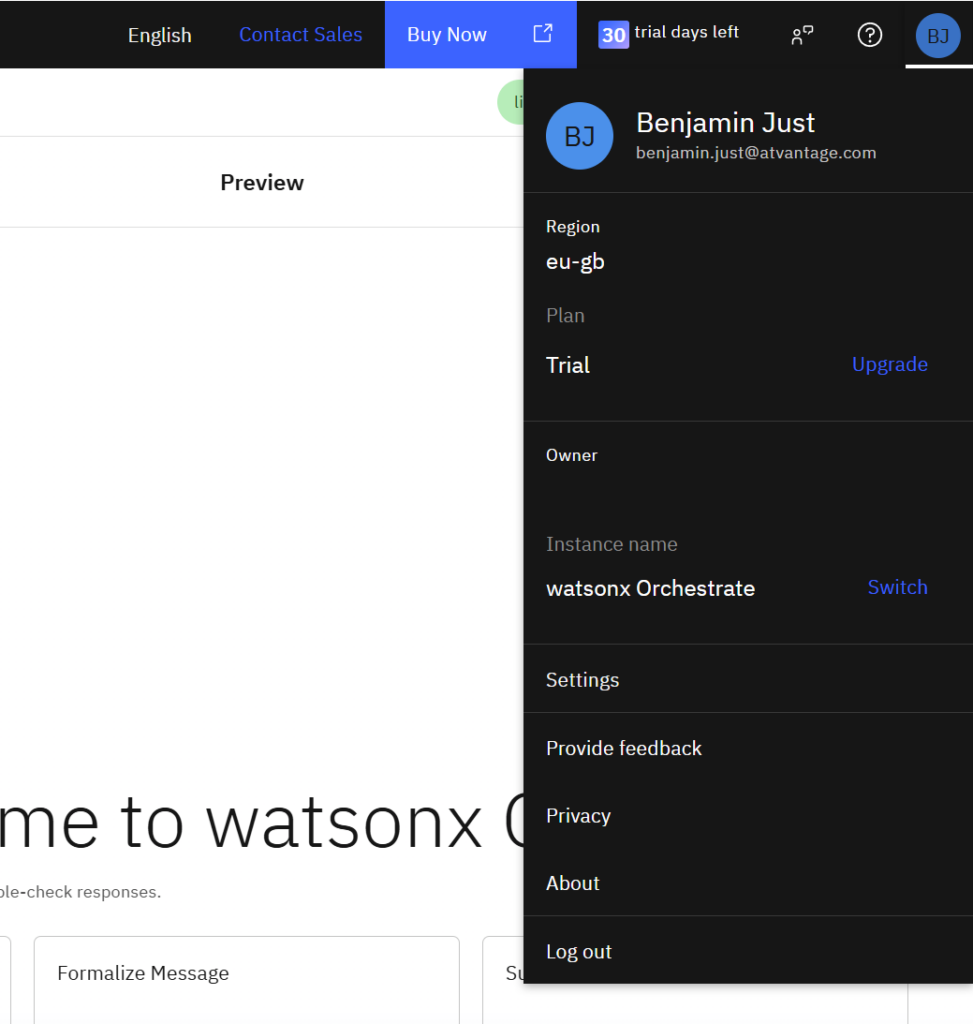
fiYou need to provide the instance URL to your wxO instance. You can find this in your user preferences ==> Settings.
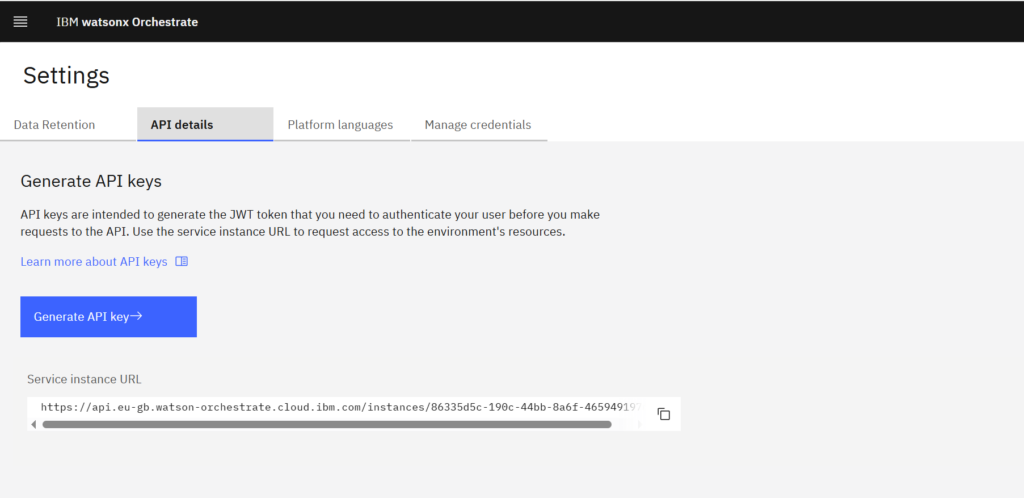
Go to „API details“ and copy the Service instance URL
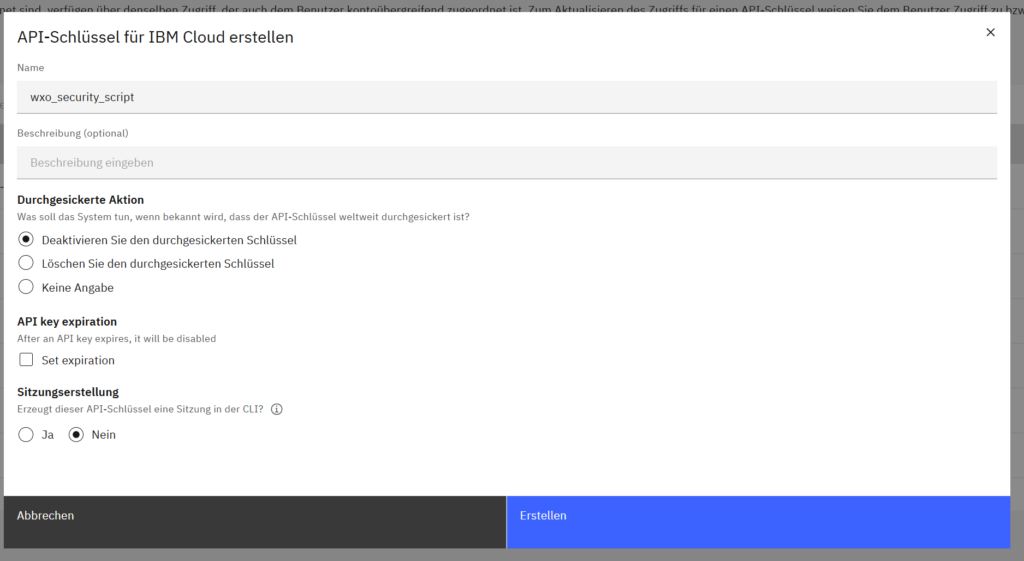
Also create a new API key.
Now run the script.